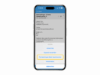
Muškarac koristi aplikaciju onOffice na svom pametnom telefonu

More Than Just an Ordinary Real Estate Agent App

onOffice To Go: Stay Productive Anytime and Anywhere with Our Real Estate Agent App.

Download the Estate Agent App Now

Breadcrumb-Navigation
Žena koristi aplikaciju onOffice na svom pametnom telefonu

The Right App for Real Estate Agents

The onOffice real estate agent app is your office in your pocket. Thanks to our reliable companion for viewings, property handovers, and client appointments, you have all your data at your fingertips on your iPhone or Android smartphone at all times.

With the onOffice app for real estate agents, you can present properties, send brochures, maintain contacts, and manage to-dos and appointments. Collect viewing confirmations and property handover reports directly on your mobile device, and combine our real estate agent app with Apple CarPlay and Android Auto for maximum added value.

Stay organized while you’re on the move!

Benefits of the onOffice Real Estate Agent App

A must-have for real estate agents: The onOffice app is the all-in-one tool for professionals on the move.

  • Pocket Phone Center

    Document calls reliably via mobile in your onOffice enterprise database – without manual follow-up.

  • Digital Protocols

    For example, have viewing confirmations digitally signed via the app and retrieve contact details with one click, which are immediately saved in the system.

  • Always Keep Everything in View

    Even on the go, you always have an overview of your emails, appointments, and tasks. Plus, our app is compatible with Apple CarPlay and Android Auto.

  • All Information in Real Time

    Thanks to push notifications from our real estate agent app, you are immediately informed about incoming emails, messenger messages, upcoming appointments, and tasks.

Highlights of Our Agent App

The onOffice App offers a wide range of features – and these are the ones that make it your ideal companion for everyday business.

onOffice broker app signature function

Sign Apartment Handover Reports via App

Discover the true power of our real estate agent app with customizable questionnaires. Whether for property surveys, apartment handover protocols, or tenant applications, you can create and sign them right on your device. Capture and document damages effortlessly by uploading photos directly within the questionnaire.

No need to worry about poor reception—our app works seamlessly offline too, ensuring you’re always productive, no matter where you are.


Apple Carplay und Android Auto nutzen in der onOffice Makler-App

Compatible with Apple CarPlay and Android Auto

The game changer for when you’re on the road: navigate to your next appointment or call contacts directly – easily done with the onOffice App via Apple CarPlay or Android Auto. Display your appointment list and details directly on your vehicle’s screen – no more searching on your phone or manually entering numbers or addresses.

Screenshot der Push-Benachrichtigungen der onOffice App

Stay Instantly Informed with Push Notifications

The ideal companion for field service and client meetings: Waiting for an important email or call? We know that speed is critical for real estate professionals. Thanks to push notifications, you receive real-time alerts right on your smartphone whenever an email arrives or a task is assigned to you. Respond immediately with all key details right at your fingertips.

Screenshot onOffice App Anruferkennung und Call Log

Identify Callers and Seamlessly Document Every Phone Call

Wondering who is on the line? That question is a thing of the past! With caller ID in the onOffice Mobile App, you instantly recognize when a client from your database calls. Your smartphone displays the contact’s full name, even if the caller is stored in onOffice enterprise but not saved in your phone’s local contact list.

Our Android app offers even more: The integrated Call Log tracks all incoming and outgoing calls, including missed calls. Easily document your phone conversations by creating a CRM activity entry directly from the call log. For unknown numbers, you can create a new contact record or assign the call to an existing contact in seconds.

Respond to Portal Leads on the Go

Outpace the competition with our mobile app. When a property portal enquiry arrives by email, review and respond to it quickly and easily from anywhere. Use your saved email templates and dispatch property brochures on the fly. Just like in the desktop version of onOffice enterprise, all correspondence is automatically logged in full detail. Stay completely flexible while offering top-tier, responsive service to your clients, all while keeping your CRM database perfectly maintained.

Effortless File Uploads

Whether it’s a listing photo, floor plan, or handwritten note, upload documents straight from your smartphone directly into your records via the onOffice App. Files are instantly available inside onOffice enterprise, allowing your office team to access them immediately. Our file uploader supports multi-file uploads and is available across emails, property records, contacts, tasks, and activity logs.

Download the App from onOffice now

Apple App Store

Google Play Store

2 osobe u automobilu koriste brokersku aplikaciju onOffice na svom pametnom telefonu.

In which versions is it included?

The Process Manager is a core feature in our premium editions or can be added as an upgrade to other plans:

  • onOffice enterprise premium
  • onOffice enterprise expert

FAQ

We answer frequently asked questions about the onOffice app.

You can log in using the same credentials as you use for the desktop software. Additionally, you can use convenient login options like Touch ID or Face ID.

Yes, absolutely! The onOffice app includes full email management capabilities. You can quickly receive and respond to emails and portal enquiries. Just ensure your email account is authorized for use within the app.

If your inbox isn’t visible in the onOffice App, it hasn’t been enabled for mobile use inside onOffice enterprise yet. To activate it, go to your user settings, select the “Email” tab, and enable the desired inbox under “Email Accounts for the onOffice App.”

The check-in feature links all appointment details (property, participants) directly with the questionnaire. The PDF is then automatically saved in the appropriate section of the onOffice software.

In the app menu, there’s an “Obtain contact details” feature. Enter the contact’s first name, last name, and either email address or phone number. You can then send a contact data completion form to your contact via SMS or email.

To receive push notifications from the onOffice App, permissions must be granted in your smartphone system settings. Email notifications are available for users with onOffice or Microsoft 365 mailboxes. To enable them, navigate to your user settings in onOffice enterprise, open the “Email” tab, and click the bell icon under “Email Accounts for the onOffice App.” Push notifications for tasks can be toggled under the “Settings” tab under “Other.”

Yes, the onOffice App is fully compatible with both Apple CarPlay and Android Auto. Access appointment details directly on your car’s display to initiate phone calls or launch turn-by-turn navigation directly to your meeting location.

Absolutely! Create or edit property and contact records directly inside our mobile app. You can also schedule appointments, create tasks, manage emails, dispatch property brochures, and more. All updates automatically sync with your onOffice enterprise database in real time.

Yes! Using our file uploader, you can easily upload documents and photos directly into your database. This feature is supported across contact and property records, tasks, activity logs, and within the email composer.

Of course. You can respond to incoming portal leads on the go just like any other email. The system automatically logs all activities, even when using the app—ensuring complete, unbroken correspondence records.

Select features in our onOffice iOS app are available offline. For instance, you can create new property or contact records and collect digital signatures on meeting reports. As soon as your device reconnects to a network, all data syncs automatically.

Additional Features

Discover core software capabilities available right inside your mobile app.

All Features of Our Real Estate Software

Discover all the functionalities onOffice enterprise and see how they simplify your daily real estate business!

Discover All Features

Smiling woman in front of laptop discovers the diverse functions of onOffice enterprise.

Any Questions?